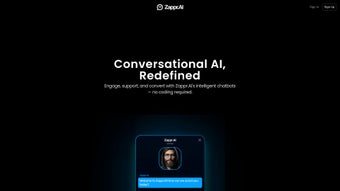

Download Zappr – AI Chatbot Builder, Customer Engagement Software
Overview
Zappr is a web‑based, subscription‑driven AI platform that lets businesses create fully‑customizable chatbots without writing a single line of code. Built for modern customer‑engagement strategies, Zappr combines natural‑language processing, document‑analysis, and multi‑channel integration to give companies a 24/7 digital assistant that can answer questions, schedule appointments, nurture leads, and even pull data from PDFs, images, and other file formats. The service is positioned as a cost‑effective alternative to hiring large support teams, promising operational efficiency, reduced human‑resource expenses, and higher satisfaction scores across global markets.
Because Zappr lives in the cloud, updates roll out automatically, ensuring that the AI stays current with the latest language models and security patches. Its integration capabilities span popular messaging platforms such as Telegram, WhatsApp, and Facebook Messenger, while its built‑in CRM tools and multilingual support allow brands to maintain a unified voice across borders. In short, Zappr is more than a chatbot builder—it is a comprehensive, AI‑powered engagement suite that helps businesses streamline communication, improve lead conversion, and maintain a consistent brand experience around the clock.
Key Features of Zappr AI
- No‑code chatbot creator: Drag‑and‑drop interface lets anyone design conversational flows without programming knowledge.
- Multi‑format data ingestion: Reads PDFs, images, CSVs, and plain‑text files so the bot can answer questions based on uploaded documents.
- Omni‑channel deployment: Seamless integration with Telegram, WhatsApp, Facebook Messenger, and website widgets for a unified chat experience.
- Advanced scheduling engine: Built‑in calendar sync that lets the bot book appointments, send reminders, and manage cancellations automatically.
- Lead management tools: Captures visitor information, qualifies prospects, and pushes data into popular CRMs such as HubSpot, Salesforce, and Zoho.
- Multilingual support: Supports over 30 languages, enabling global businesses to serve customers in their native tongue.
- Real‑time analytics dashboard: Tracks conversation metrics, satisfaction scores, and conversion rates to help teams iterate quickly.
- Secure cloud hosting: End‑to‑end encryption, GDPR compliance, and regular security audits keep data safe.
- AI‑driven suggestions: The platform suggests improvements to bot scripts based on user interactions and sentiment analysis.
- Scalable pricing model: Tiered subscription plans accommodate startups to enterprises, with a free trial to test core features.
How to Install and Use Zappr
Getting started with Zappr is intentionally straightforward. First, navigate to the official Zappr website and click the “Start Free Trial” button. After entering a valid email address and creating a secure password, you’ll receive a verification link. Once verified, you’ll be taken to the dashboard where the wizard guides you through the bot‑creation process.
Step 1 – Choose a template: Zappr offers industry‑specific templates (e.g., e‑commerce support, healthcare intake, SaaS onboarding). Selecting a template pre‑populates common intents, reducing the time needed to map out conversation pathways.
Step 2 – Customize the flow: Using the visual builder, drag nodes such as “Ask for Name,” “Show Product Options,” or “Confirm Appointment.” Each node can be enriched with conditional logic, API calls, or file uploads. For instance, you can attach a PDF brochure, and Zappr’s AI will automatically extract relevant sections to answer user queries.
Step 3 – Connect channels: In the “Integrations” tab, toggle the switches for Telegram, WhatsApp, or Messenger. Zappr provides QR‑code or webhook instructions for each platform, and the connection is verified in real time.
Step 4 – Test the bot: The built‑in simulator lets you converse with the bot as a user would. You can view response times, adjust language, and correct misunderstandings before going live.
Step 5 – Publish and monitor: Once satisfied, hit “Publish.” The bot becomes instantly active on selected channels. The analytics pane updates continuously, showing metrics like total conversations, bounce rate, and lead conversion. If you notice gaps, you can return to the builder, make adjustments, and republish without downtime.
Throughout the process, Zappr’s help center offers step‑by‑step guides, video tutorials, and a community forum where users share best practices. The platform also supports single sign‑on (SSO) with Google Workspace or Azure AD, simplifying user management for larger teams.
Pros and Cons
Pros
- Intuitive no‑code interface reduces development time dramatically.
- Ability to ingest PDFs and images makes the bot highly knowledgeable without manual FAQ entry.
- Omni‑channel support ensures consistent customer experience across popular messengers.
- Built‑in scheduling and lead capture features replace separate tools, saving costs.
- Multilingual capabilities broaden market reach and improve global support.
- Robust analytics help teams refine conversational flows based on real data.
- Secure, GDPR‑compliant hosting gives peace of mind for data‑sensitive industries.
- Scalable pricing accommodates startups and enterprises alike.
Cons
- Subscription model may be pricey for very small businesses after the free trial expires.
- Advanced customizations (e.g., deep API integrations) require a higher‑tier plan.
- Learning curve for complex conditional logic can be steep for non‑technical users.
- Limited offline support; the platform requires an internet connection to function.
- Currently no native desktop application—usage is confined to web browsers.
Compatibility: As a cloud‑native web app, Zappr runs on any modern browser across Windows, macOS, Linux, Android, and iOS devices. No additional installations are required, making it ideal for remote teams that use a mix of operating systems.
Conclusion & Call to Action
Zappr stands out in the crowded chatbot market by delivering a truly no‑code, AI‑enhanced solution that can understand and act on a wide variety of document types. Its blend of multi‑channel connectivity, scheduling automation, and lead management means that businesses can replace several disparate tools with a single, secure platform. While the subscription cost may be a consideration for very small teams, the time saved on development, the reduction in human support overhead, and the increase in conversion rates quickly justify the investment for most medium‑to‑large enterprises.
If you’re looking to modernize your customer service, accelerate lead nurturing, or simply provide a 24/7 digital assistant without hiring additional staff, Zappr offers a compelling package. The free trial removes the risk, allowing you to experiment with real data and see immediate results. Ready to transform the way you engage with customers? Start your free trial today and experience AI‑driven conversations that work for you.
Frequently Asked Questions
Can Zappr handle confidential documents?
Yes. Zappr uses end‑to‑end encryption and complies with GDPR and ISO 27001 standards, ensuring that uploaded PDFs or images are stored securely and processed only within the platform’s protected environment.
Do I need any programming knowledge to create a bot?
No. The visual drag‑and‑drop builder is designed for non‑technical users. Advanced users can still add custom API calls or JavaScript snippets if needed, but the core functionality works entirely without code.
Which messaging platforms are supported?
Zappr integrates natively with Telegram, WhatsApp, Facebook Messenger, and can be embedded as a web widget on any website. Additional platforms can be added via webhook integration.
Is there a limit to the number of bots I can create?
The limit depends on your subscription tier. The basic plan allows up to three active bots, while higher‑tier plans support unlimited bots and advanced features such as dedicated AI models.
How does Zappr improve lead conversion?
Zappr captures visitor information during conversations, qualifies leads using AI‑driven intent detection, and pushes qualified contacts directly into your CRM. Automated follow‑up messages and appointment scheduling further nurture prospects, increasing conversion rates.






